Moving illustrations
Paint a scene that breathes. Watercolor that blooms, ink that feathers, grass that sways, smoke that curls and fireflies that drift, each from one stroke of a Motion Brush.
Paint your first scene

Motion Brushes · For iPad, iPhone, Mac & Apple Pencil
Doodly Doodle is built on Motion Brushes: seven real media, each brush with a motion of its own, and smoke, rain and fireflies that follow your line. Water ripples, grass sways, the page breathes. No keyframes, no timeline. Just painting.
On the App Store for iPad, iPhone and Mac · Free to start · Plus for CA$9.99, once
Art, brought to life
Illustrations brought to life in Doodly Doodle: each one is an image layer, and every moving wash and line is painted over it in the app.
The ink outlines of the flowers ripple as if in a breeze, and drops of colour drift around the spike.
Flame-coloured washes flicker along the dragon’s back and mane, and its pen line redraws itself on every held frame, like hand-drawn animation.
Colour moves through the robe and the glow around it, and the lines of the face redraw themselves.
Clouds roll and the water churns as the carp leaps; the ink of its scales and the splashes stays alive.
The original illustration is an imported image; the strokes painted over it are editable. Download a .doodly to open it in the app.
01 / What you can make
Every Motion Brush is a medium, its marks and a motion. Paint with one and the stroke keeps going after you lift: no animation to set up, nothing to keyframe.
Paint a scene that breathes. Watercolor that blooms, ink that feathers, grass that sways, smoke that curls and fireflies that drift, each from one stroke of a Motion Brush.
Paint your first sceneLay out a page from over seventy comic, manga, strip and storyboard layouts, paint each panel alive, and add pages to make a book. Share it as a moving web page, an ebook for Apple Books or a PDF.
Lay out a comicPaint illustrated books by number, colour them freely, or bring your own PDF. Paint stays inside the lines it starts in, and every stroke can sway, shimmer or glow. Five picture books and three single pictures, made for painting by number, come with the app: two books and the single pictures are free, and the first page of every other book; their line art was made with AI assistance.
Paint by numberShort lessons on every brush and effect: trace a small scene with the tool it teaches, then press Play and watch it move. Then tracing practice a few minutes a day, from lines and ellipses to boxes, cylinders and perspective, each with a score and one tip, and a streak that forgives a missed day. Badges for practice, drawing days and strokes into the millions, if you want them.
Start practisingAnd paint on one page with a friend: Draw together uses SharePlay.
02 / A gentle way in
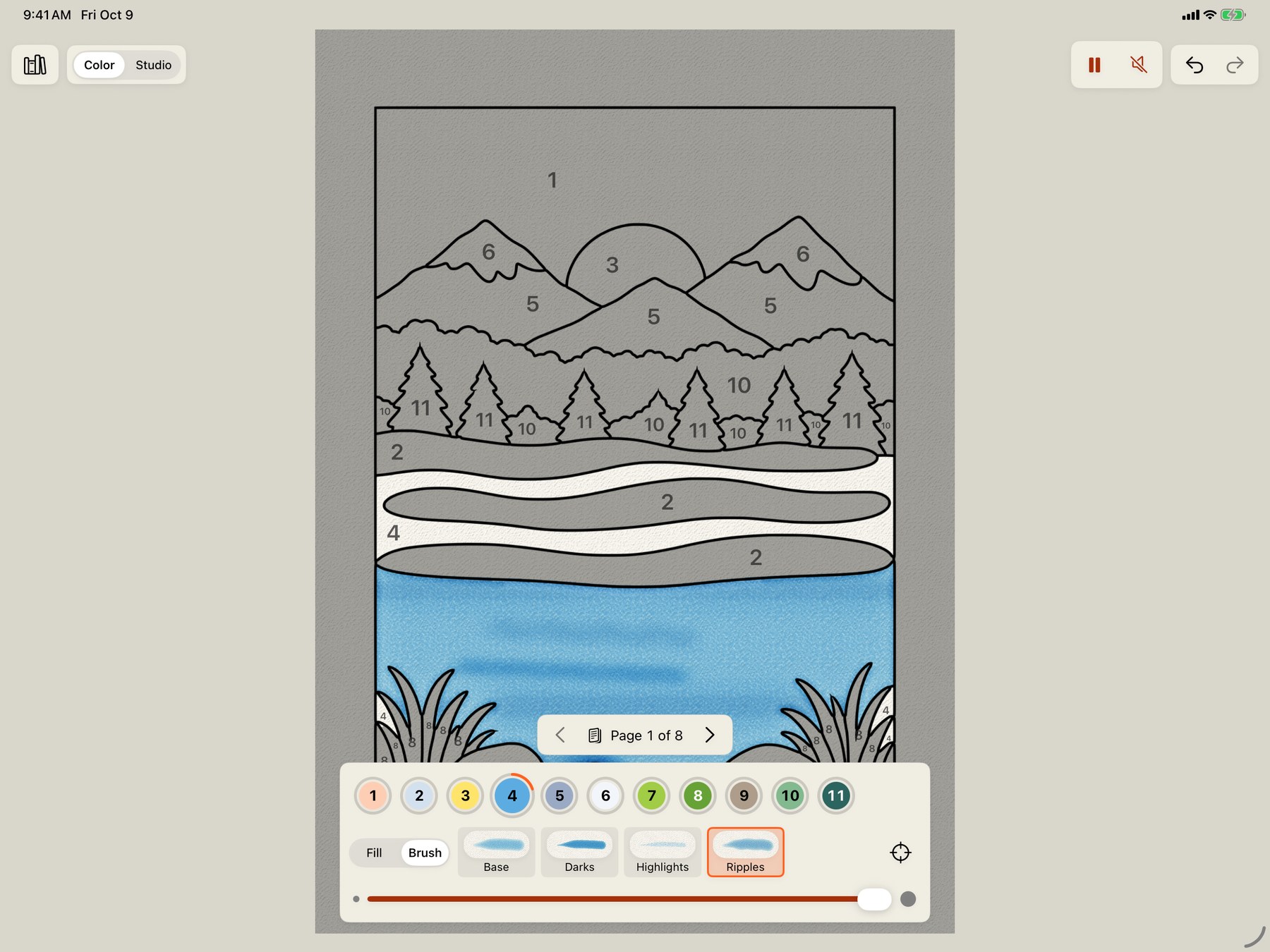
The books that come with the app are made to paint by number: five books of pictures, from animals to seasons, and three single pictures, each built around something that moves. They open in Color, a simple screen with a number in every area. Tap a number and all its areas are chosen; tap an area and it paints itself in as a painter would: a base, darks away from the light, highlights toward it, and a brush that moves, so the lake ripples and the leaves rustle. Or take Brush and paint each step yourself; paint stays inside the number’s areas wherever the stroke starts.
It is a gentle way into painting: one step at a time, you see how a painting is built in layers of colour, and the page comes alive as you go. Switch to the Studio at any time for every brush, layer and effect on the same page. Rather choose your own colours? Start the same book as a plain coloring book, or turn the numbers off on any page. Every book has music of its own, changing with the picture.
How paint by number worksFree, and every step uses a Free brush.
03 / Every medium moves
Watercolor that blooms and dries, ink that feathers into the paper, pen, pencil, charcoal, pastel and marker. Choose one on the stroke wheel, give the brush a motion, and draw.
04 / Motion and effects
Forty-eight motions and Still: pick one by watching it move on the wheel, and every stroke you draw carries it, or stack several. Change your mind later: select strokes already painted to set them moving, give them more or less motion, or hold them still. Effects are marks with a life of their own, in families from fire and smoke to weather, water and magic, each painted in one colour a stroke and built up in layers, like paint. See any of them in any medium.
Show
Medium
Family
05 / A painting that moves
Soft watercolor washes, fine pen details, and a gentle breeze. Wind gives this wildflower painting a life of its own; it is the painting the app opens with.
Every stroke stays editable. Open the study to explore the marks and make it your own.
Download the editable studyOpen the .doodly file in Doodly Doodle when you have the app.
06 / Inside the app
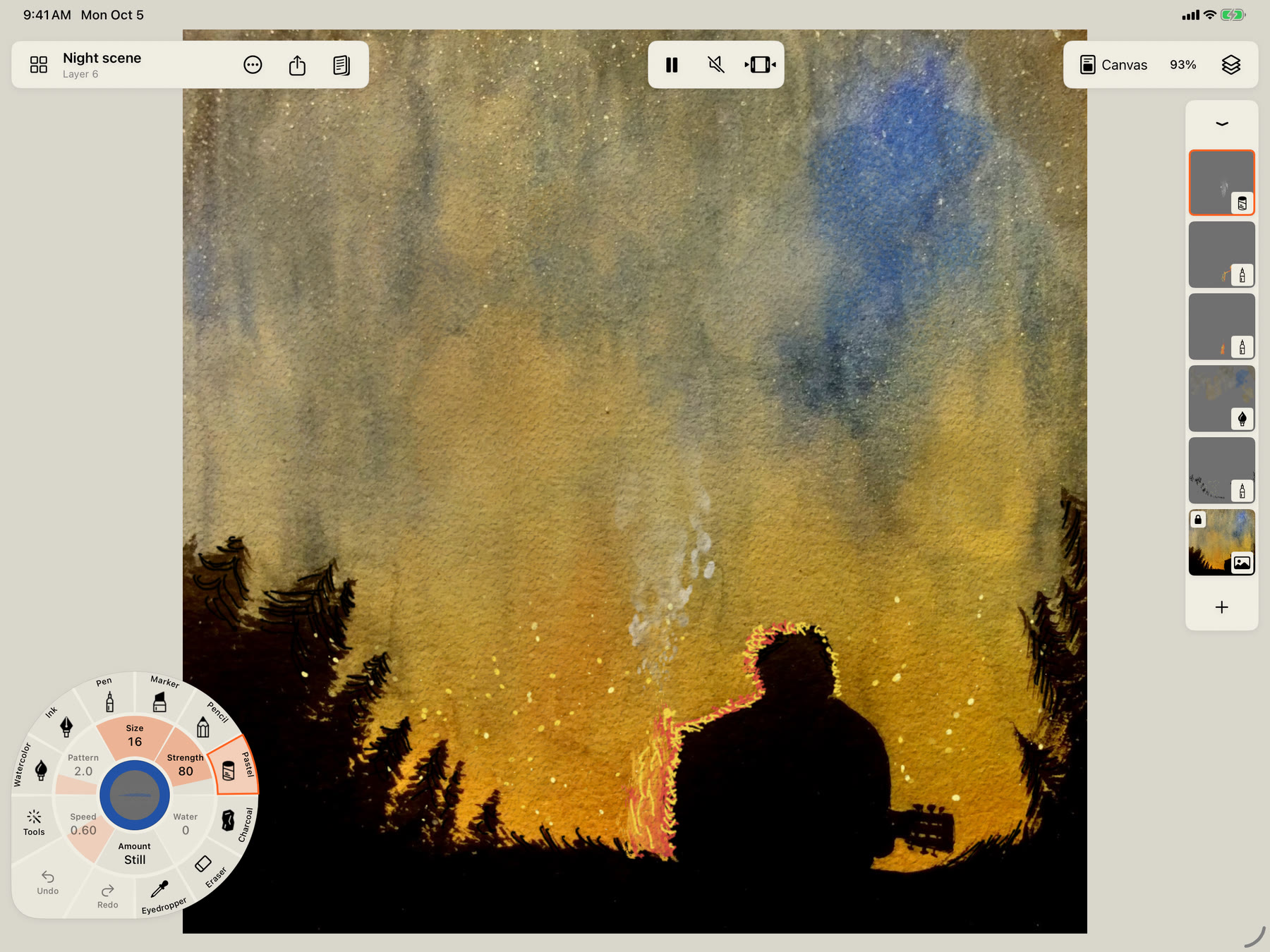
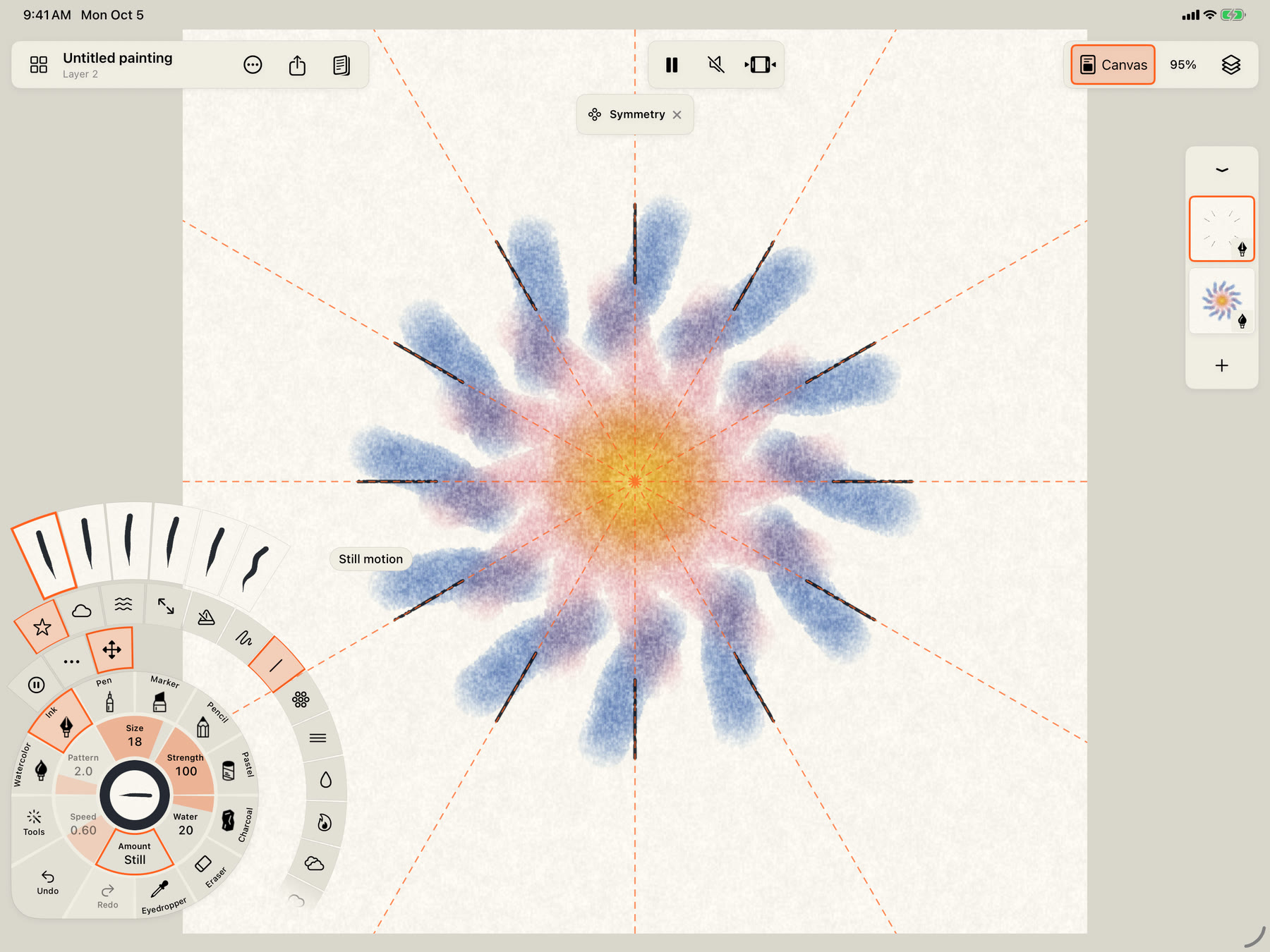
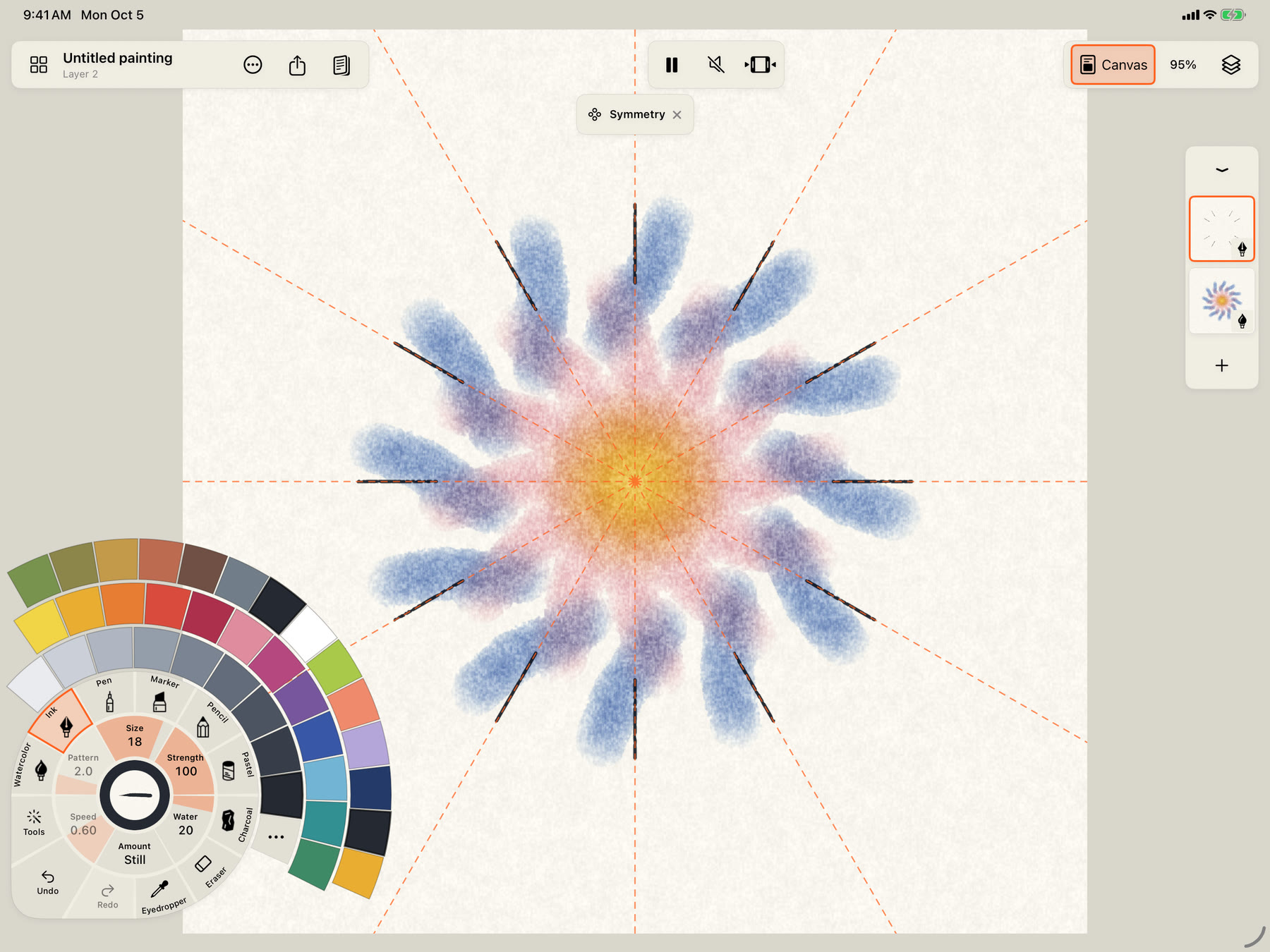
Everything about the next stroke sits on the stroke wheel under your thumb: medium, brush, size, water, colour and motion. Squeeze Apple Pencil and it comes to the pen.
07 / And also
Mirror across either axis, or fold a mark up to twenty-four times. Motion moves the whole figure, so a mandala can breathe as one.
Text is drawn along the letters’ centrelines in single-line fonts, as real strokes that can take any medium and move.
A ruler, an ellipse and a French curve; one- to six-point perspective, isometric and square grids. Snap a wobbly line straight, or a loop round.
Multiply, Screen, Add, Lighten and Glaze. Hue, saturation, levels, tone curves and blur. Clip a layer to the one below.
Tap marks or loop around them to move, scale, rotate or recolour them, or to change how they move. Select every stroke of a colour, a brush or a motion at once.
Fourteen papers in any colour, seven of them scanned, including a cold press from a real block of Arches.
Hear the pencil on the paper as you paint, and music that follows your marks and colours. Every painting can play its own soundtrack and export it.
The app speaks English and sixteen more languages, from Arabic and Hebrew to Japanese, Korean and Thai.
Paintings save on your device, with a self-contained copy in Files to move between devices. Export WebP, PNG, HEIF, AVIF, TIFF or layered PSD, video, GIF or a time-lapse.
08 / A few small beginnings
Choose a brush, make a wash, and find your way around the canvas.
Open tutorial ↗ 02 / Give it movementPaint a moving stroke, adjust its character, and leave room for stillness.
Open tutorial ↗ 03 / Add an effectDraw a line and let an effect follow it: mist, embers, leaves or a magic trail.
Open tutorial ↗
“The time spent making it should matter as much as the finished piece.”
Simon Breslav · The story behind Doodly Doodle ↗